
Setup CloudFront Functions dan Lambda@Edge untuk Modifikasi Response di Edge Network
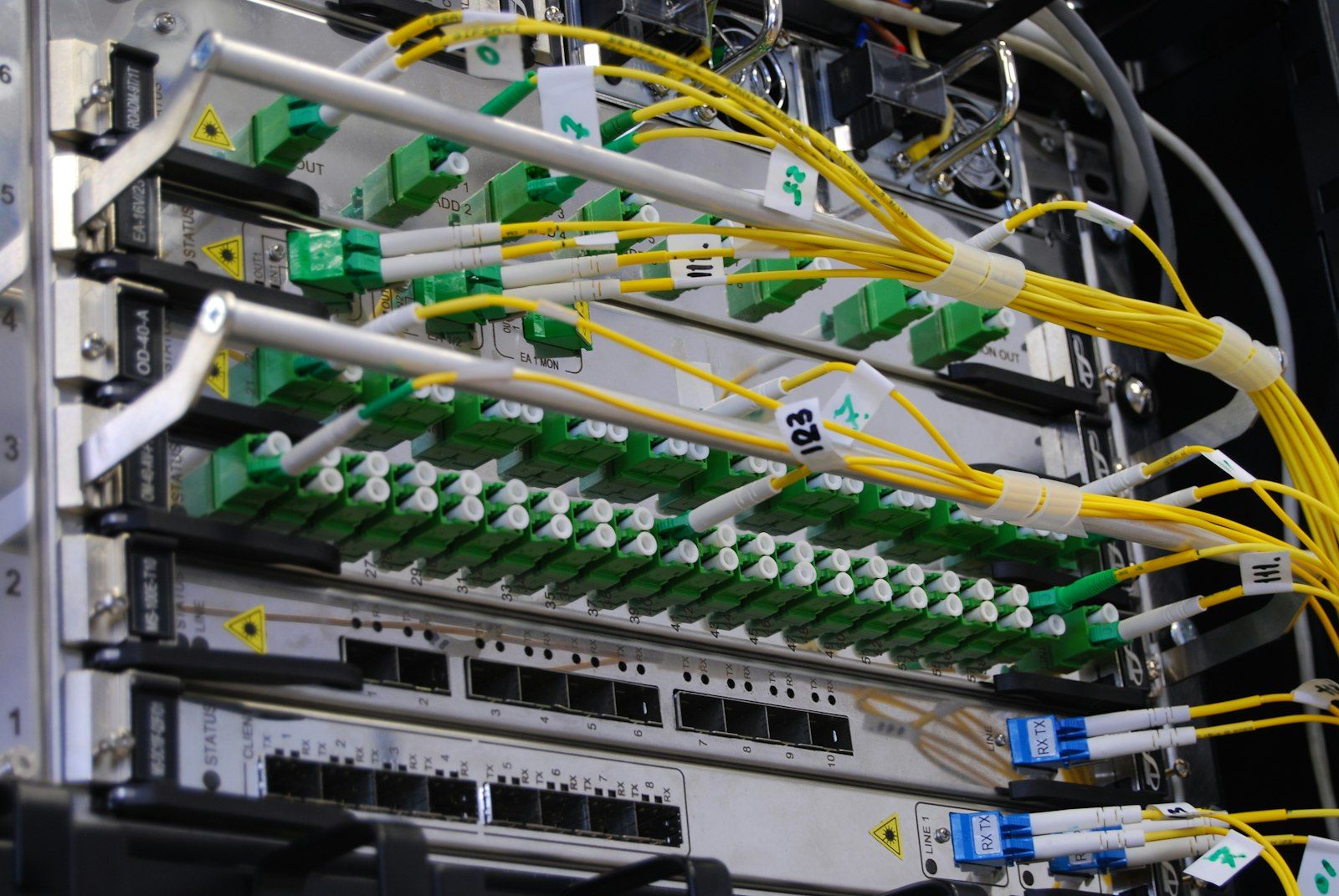
Dua Titik Eksekusi di Edge Network dan Perbedaannya
CloudFront Functions dan Lambda@Edge sama-sama menjalankan kode di edge location, tetapi keduanya menempati posisi berbeda dalam siklus request. CloudFront Functions hanya mendukung dua trigger: viewer request dan viewer response. Kode berjalan sebelum request meninggalkan edge atau tepat sebelum response dikirim ke browser. Batas waktunya di bawah 1 milidetik, dan runtime hanya menyediakan sebagian JavaScript tanpa akses jaringan.
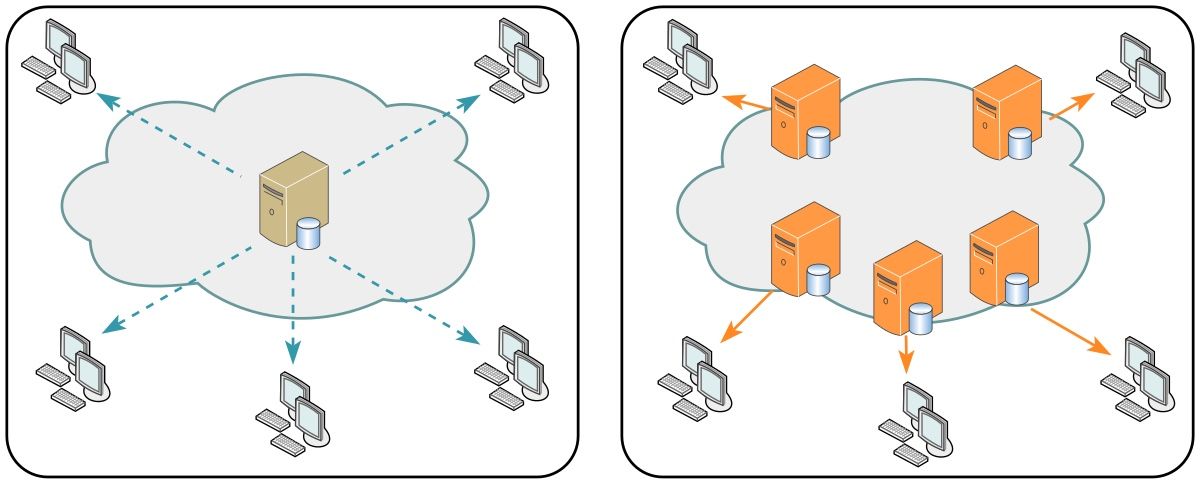
Gambar: Satu origin terpusat (kiri) dibandingkan CDN dengan banyak server cache di dekat pengunjung (kanan) — Sumber: Wikimedia Commons (CC0)
Lambda@Edge mendukung empat trigger: viewer request, viewer response, origin request, dan origin response. Dua trigger terakhir berjalan pada edge yang lebih dekat ke origin. Posisi ini memungkinkan kode membaca body response dan memanggil service lain. Batas waktunya 5 detik pada trigger viewer dan 30 detik pada trigger origin, dengan memory sampai 10240 MB pada trigger origin.
Perbedaan kapasitas menentukan pilihan. CloudFront Functions membatasi ukuran kode pada 10 KB, tanpa require, tanpa fetch, dan tanpa akses body. Lambda@Edge menerima paket Node.js lengkap dengan node_modules, akses jaringan, serta body request dan response.
Kriteria pemilihan menjadi sederhana. Modifikasi header, normalisasi URL, dan redirect cukup ditangani CloudFront Functions. Transformasi HTML, penandatanganan request ke origin, dan pemanggilan API eksternal membutuhkan Lambda@Edge.
Posisi trigger juga menentukan isi response yang terlihat. Pada viewer response, kode menerima response akhir setelah header cache ditambahkan CloudFront. Pada origin response, kode masih dapat mengubah body sebelum response disimpan ke cache. Perubahan pada origin response ikut tersimpan, sedangkan perubahan pada viewer response hanya berlaku pada request yang sedang berjalan.
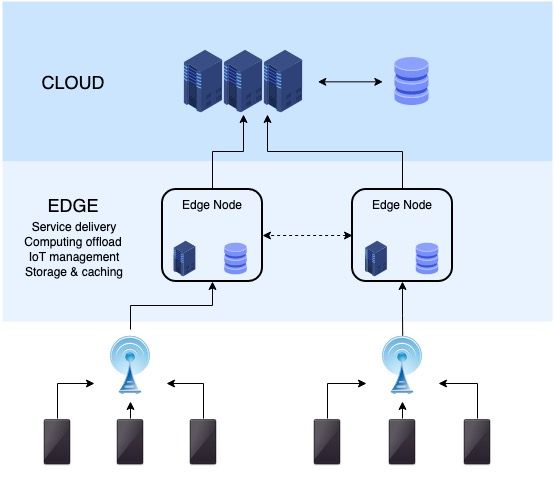
Gambar: Edge node menempati lapisan perantara antara perangkat pengunjung dan cloud origin, sehingga function berjalan sebelum request mencapai origin — Sumber: Wikimedia Commons (CC BY-SA 4.0)
Satu konsekuensi biaya perlu dicatat. Function pada viewer response dijalankan pada setiap request yang melewati edge, bukan hanya saat cache miss. Distribusi dengan satu juta request per bulan mengeksekusi function satu juta kali, terlepas dari rasio cache hit. Biaya CloudFront Functions dihitung per invocation dengan harga jauh di bawah Lambda@Edge, dan selisih itu tetap terasa pada traffic besar.
Menulis CloudFront Function untuk Menambahkan Security Header
Function ditulis sebagai satu objek dengan fungsi handler. Pada viewer response, event.response memuat statusCode, statusDescription, dan headers. Setiap header berupa objek dengan satu properti value. Response yang dikembalikan handler menggantikan response yang dikirim ke browser.
Empat header keamanan yang paling sering dipasang: Strict-Transport-Security mengunci browser ke HTTPS, X-Content-Type-Options mencegah MIME sniffing, X-Frame-Options menutup clickjacking, dan Referrer-Policy membatasi data referer yang dikirim ke domain lain.
Header yang bocor dari origin juga perlu dihapus. X-Powered-By mengungkap framework, dan Server mengungkap versi web server. Keduanya memberi petunjuk bagi pemindai otomatis yang mencari versi rentan. Penghapusan dilakukan dengan delete headers["x-powered-by"].
Batasan runtime harus dipatuhi sejak awal. Kode memakai sintaks ES 5.1, tanpa let, const, dan arrow function. Tidak ada require, process, atau fetch. Ukuran file maksimal 10 KB, dan total header pada response dibatasi 100 entri.
Function menempel ke cache behavior lewat association Viewer response. Satu function dapat dipakai beberapa cache behavior sekaligus, tetapi satu cache behavior hanya menerima satu function per trigger.
function handler(event) {
  var response = event.response;
  var headers = response.headers;

  headers["strict-transport-security"] = {
    value: "max-age=63072000; includeSubDomains; preload"
  };
  headers["x-content-type-options"] = { value: "nosniff" };
  headers["x-frame-options"] = { value: "DENY" };
  headers["referrer-policy"] = { value: "strict-origin-when-cross-origin" };

  delete headers["x-powered-by"];
  delete headers["server"];

  return response;
}

var viewerResponseEvent = {
  version: "1.0",
  context: {
    distributionDomainName: "d111111abcdef8.cloudfront.net",
    distributionId: "E2EXAMPLE12345",
    eventType: "viewer-response",
    requestId: "EXAMPLE-request-id"
  },
  viewer: {
    ip: "203.0.113.10"
  },
  request: {
    method: "GET",
    uri: "/index.html",
    querystring: {},
    headers: {
      host: { value: "d111111abcdef8.cloudfront.net" }
    }
  },
  response: {
    statusCode: 200,
    statusDescription: "OK",
    headers: {
      "content-type": { value: "text/html; charset=utf-8" },
      "cache-control": { value: "no-cache" },
      server: { value: "nginx/1.24.0" },
      "x-powered-by": { value: "Express" }
    }
  }
};

function printHeaders(label, headers) {
  console.log(label);
  Object.keys(headers).sort().forEach(function (name) {
    console.log("  " + name + ": " + headers[name].value);
  });
}

printHeaders("Before modification", viewerResponseEvent.response.headers);

var output = handler(viewerResponseEvent);

printHeaders("After modification", output.headers);
console.log(
  "Origin leak headers present: " +
    ("server" in output.headers || "x-powered-by" in output.headers)
);
Output:
Before modification
  cache-control: no-cache
  content-type: text/html; charset=utf-8
  server: nginx/1.24.0
  x-powered-by: Express
After modification
  cache-control: no-cache
  content-type: text/html; charset=utf-8
  referrer-policy: strict-origin-when-cross-origin
  strict-transport-security: max-age=63072000; includeSubDomains; preload
  x-content-type-options: nosniff
  x-frame-options: DENY
Origin leak headers present: false
Python Fundamentals
Master the fundamentals of Python through hands-on, real-world projects. Designe...
Blok di atas berjalan dengan node tanpa dependensi. Output pertama menampilkan header asli dari origin, termasuk server dan x-powered-by. Output kedua menampilkan header setelah modifikasi, dengan empat header keamanan bertambah dan dua header bocor hilang. Nilai cache-control dan content-type tetap sama karena handler hanya menyentuh nama header yang ditargetkan.
Menguji Function Secara Lokal dengan Event Simulator
Event CloudFront Functions berbentuk objek JSON dengan lima kunci: version, context, viewer, request, dan response. Kunci context memuat distributionId dan eventType, sedangkan viewer memuat alamat IP pengunjung. Bentuk ini stabil, sehingga satu file fixture dapat dipakai berulang.
Harness pengujian cukup memanggil handler dengan response palsu, lalu memeriksa hasilnya. Assertion ditulis sebagai daftar kondisi sederhana. Setiap kondisi mencetak PASS atau FAIL, dan jumlah kondisi yang lolos dihitung di akhir.
Pengujian lokal jauh lebih murah daripada deploy berulang. Setiap publish function menambah versi baru, dan setiap asosiasi ke distribution memicu propagasi ke seluruh edge. Siklus itu memakan waktu beberapa menit. Satu file uji lokal menyelesaikan pemeriksaan yang sama dalam hitungan milidetik. Berkas fixture sebaiknya disimpan di repository dan dijalankan pada pipeline, sehingga regresi header tertangkap sebelum versi baru diterbitkan.
Simulasi tetap punya batas. Perilaku cache tidak dapat direplikasi karena bergantung pada cache policy dan isi edge location. Negosiasi TLS juga tidak berjalan di sandbox. Header yang ditolak CloudFront, misalnya nama dengan karakter tidak valid, baru terlihat setelah deploy.
function handler(event) {
  var response = event.response;
  var headers = response.headers;

  headers["strict-transport-security"] = {
    value: "max-age=63072000; includeSubDomains; preload"
  };
  headers["x-content-type-options"] = { value: "nosniff" };
  headers["x-frame-options"] = { value: "DENY" };
  headers["referrer-policy"] = { value: "strict-origin-when-cross-origin" };

  delete headers["x-powered-by"];
  delete headers["server"];

  return response;
}

function buildEvent() {
  return {
    version: "1.0",
    context: {
      distributionDomainName: "d111111abcdef8.cloudfront.net",
      distributionId: "E2EXAMPLE12345",
      eventType: "viewer-response",
      requestId: "test-request"
    },
    viewer: { ip: "203.0.113.10" },
    request: {
      method: "GET",
      uri: "/",
      querystring: {},
      headers: { host: { value: "example.com" } }
    },
    response: {
      statusCode: 200,
      statusDescription: "OK",
      headers: {
        "content-type": { value: "text/html; charset=utf-8" },
        server: { value: "nginx/1.24.0" },
        "x-powered-by": { value: "Express" }
      }
    }
  };
}

var checks = [];

function check(name, condition) {
  checks.push({ name: name, passed: Boolean(condition) });
}

var result = handler(buildEvent());
var headers = result.headers;

check(
  "Strict-Transport-Security",
  headers["strict-transport-security"] &&
    headers["strict-transport-security"].value.indexOf("max-age=63072000") === 0
);
check(
  "X-Content-Type-Options",
  headers["x-content-type-options"] &&
    headers["x-content-type-options"].value === "nosniff"
);
check(
  "X-Frame-Options",
  headers["x-frame-options"] && headers["x-frame-options"].value === "DENY"
);
check(
  "Referrer-Policy",
  headers["referrer-policy"] &&
    headers["referrer-policy"].value === "strict-origin-when-cross-origin"
);
check("Server header removed", !("server" in headers));
check("X-Powered-By removed", !("x-powered-by" in headers));
check("Status code preserved", result.statusCode === 200);

var passed = 0;

checks.forEach(function (item) {
  console.log((item.passed ? "PASS" : "FAIL") + " " + item.name);
  if (item.passed) {
    passed += 1;
  }
});

console.log("Summary: " + passed + "/" + checks.length + " checks passed");
Output:
PASS Strict-Transport-Security
PASS X-Content-Type-Options
PASS X-Frame-Options
PASS Referrer-Policy
PASS Server header removed
PASS X-Powered-By removed
PASS Status code preserved
Summary: 7/7 checks passed
Tujuh baris PASS dan satu baris Summary: 7/7 checks passed menandakan function siap dipublish. Bila salah satu kondisi gagal, nama header pada baris FAIL langsung menunjuk bagian yang perlu diperbaiki.
Lambda@Edge untuk Transformasi Body dan Pemanggilan Origin
Lambda@Edge memakai bentuk event berbeda. Setiap invocation dibungkus dalam event.Records[0].cf, dengan properti config, request, dan response. Properti response.body berisi body dalam base64, dan bodyEncoding menegaskan format tersebut. Handler ditulis sebagai exports.handler yang mengembalikan Promise.
Transformasi body hanya boleh terjadi pada response HTML. Pemeriksaan content-type mencegah function menyentuh file biner seperti gambar atau font. Body didekode, disisipkan penanda versi build, lalu dikodekan ulang.
Setelah body berubah, content-length wajib dihitung ulang. Panjang string tidak sama dengan jumlah byte untuk karakter non-ASCII, jadi perhitungan memakai Buffer.byteLength. Nilai lama yang dibiarkan akan memotong response di browser atau memicu kesalahan protokol.
Syarat deployment bersifat mengikat. Function dibuat di region us-east-1, trust policy role menyertakan edgelambda.amazonaws.com dan lambda.amazonaws.com, dan asosiasi memakai ARN versi, bukan ARN fungsi. Nomor versi harus dipublish lebih dulu.
Replikasi membawa konsekuensi operasional. Setiap perubahan kode membutuhkan version baru, dan asosiasi pada cache behavior harus diperbarui. Rollback dilakukan dengan mengarahkan asosiasi ke versi sebelumnya, bukan dengan mengubah kode.
var BUILD_LABEL = "build-2026-11-14";

exports.handler = async function (event) {
  var record = event.Records[0].cf;
  var response = record.response;
  var headers = response.headers;

  var contentType = headers["content-type"];
  var isHtml = contentType && contentType[0].value.indexOf("text/html") === 0;

  if (!isHtml) {
    return response;
  }

  var original = Buffer.from(response.body, "base64").toString("utf8");
  var banner =
    '<div class="build-banner" data-build="' +
    BUILD_LABEL +
    '">Served from edge: ' +
    BUILD_LABEL +
    "</div>";

  var modified = original.replace("<body>", "<body>\n" + banner);

  response.body = Buffer.from(modified, "utf8").toString("base64");
  response.bodyEncoding = "base64";
  headers["content-length"] = [
    { key: "Content-Length", value: String(Buffer.byteLength(modified, "utf8")) }
  ];
  headers["x-edge-build"] = [{ key: "X-Edge-Build", value: BUILD_LABEL }];

  return response;
};

var html = "<html><head><title>Edge</title></head><body><h1>Halo</h1></body></html>";

var fakeEvent = {
  Records: [
    {
      cf: {
        config: { distributionId: "E2EXAMPLE12345" },
        request: {
          uri: "/index.html",
          method: "GET",
          headers: {}
        },
        response: {
          status: "200",
          statusDescription: "OK",
          headers: {
            "content-type": [
              { key: "Content-Type", value: "text/html; charset=utf-8" }
            ],
            "content-length": [
              { key: "Content-Length", value: String(Buffer.byteLength(html, "utf8")) }
            ]
          },
          body: Buffer.from(html, "utf8").toString("base64"),
          bodyEncoding: "base64"
        }
      }
    }
  ]
};

exports.handler(fakeEvent).then(function (result) {
  var decoded = Buffer.from(result.body, "base64").toString("utf8");

  console.log(decoded);
  console.log("content-length: " + result.headers["content-length"][0].value);
  console.log("byte length check: " + Buffer.byteLength(decoded, "utf8"));
});
Output:
<html><head><title>Edge</title></head><body>
<div class="build-banner" data-build="build-2026-11-14">Served from edge: build-2026-11-14</div><h1>Halo</h1></body></html>
content-length: 168
byte length check: 168
Output menampilkan HTML dengan div banner tepat setelah tag <body>, lalu nilai content-length yang sudah dihitung ulang dan sama dengan byte length check. Baris terakhir itu menjadi bukti bahwa panjang byte konsisten dengan isi body.
Deploy, Ukur, dan Jaga Konsistensi Konfigurasi
CloudFront Functions melewati tiga perintah: create-function, publish-function, dan associate-function. Perintah pertama menyimpan kode sebagai development function. Perintah kedua menerbitkan versi yang tidak dapat diubah. Perintah ketiga memasang versi tersebut ke cache behavior dengan EventType viewer-response.
Lambda@Edge memakai aws lambda publish-version, lalu ARN versi dimasukkan ke LambdaFunctionAssociations pada distribution config. Pembaruan distribution memakai update-distribution dengan ETag dari get-distribution-config. Tanpa ETag yang benar, perintah ditolak.
Metrik utama ada empat. FunctionExecutionTime menunjukkan biaya komputasi, FunctionThrottles menandai batas konkurensi, LambdaExecutionError menghitung exception pada Lambda@Edge, dan EdgeFunctionErrors tersedia di metrik distribution. Lonjakan pada dua metrik terakhir biasanya berasal dari bentuk event yang tidak sesuai asumsi.
Rollout dilakukan bertahap. Function diuji pada distribution staging, header dibandingkan dengan curl -I, lalu asosiasi dipindahkan ke produksi. Perbandingan header memastikan tidak ada header ganda atau header wajib yang hilang. curl -I juga memperlihatkan nilai age dan x-cache. Dari situ We dapat memastikan response diambil dari edge atau diteruskan ke origin.
CloudWatch alarm sebaiknya dipasang pada LambdaExecutionError dan FunctionThrottles. Kedua metrik itu memberi sinyal lebih awal daripada laporan pengguna. Ambang sederhana seperti satu error dalam lima menit sudah cukup untuk memulai investigasi.
Pengelolaan lewat IaC menjaga asosiasi tetap ada. Distribution yang diperbarui manual dapat kehilangan LambdaFunctionAssociations bila config lama dipakai ulang. Template CloudFormation, Terraform, atau AWS CDK menyimpan asosiasi bersama distribution, sehingga setiap perubahan melewati review yang sama.
FUNCTION_NAME="security-headers"
DIST_ID="E2EXAMPLE12345"

aws cloudfront create-function \
  --name "$FUNCTION_NAME" \
  --function-config Comment="security headers",Runtime=cloudfront-js-2.0 \
  --function-code fileb://function.js

ETAG=$(aws cloudfront describe-function \
  --name "$FUNCTION_NAME" \
  --query "ETag" --output text)

aws cloudfront publish-function \
  --name "$FUNCTION_NAME" \
  --if-match "$ETAG"

FUNCTION_ARN=$(aws cloudfront describe-function \
  --name "$FUNCTION_NAME" \
  --query "FunctionSummary.FunctionMetadata.FunctionARN" --output text)

DIST_ETAG=$(aws cloudfront get-distribution-config \
  --id "$DIST_ID" \
  --query "ETag" --output text)

aws cloudfront associate-function \
  --if-match "$DIST_ETAG" \
  --distribution-id "$DIST_ID" \
  --function-associations "Quantity=1,Items=[{EventType=viewer-response,FunctionARN=$FUNCTION_ARN}]"

EDGE_ARN=$(aws lambda publish-version \
  --function-name edge-origin-response \
  --region us-east-1 \
  --query "FunctionArn" --output text)
We menjalankan rangkaian perintah itu pada akun staging lebih dulu, lalu memeriksa Status distribution sampai bernilai Deployed. Setelah itu, curl -I pada domain staging memperlihatkan header keamanan yang baru. Bila hasilnya sesuai, asosiasi yang sama dipasang pada distribution produksi.
Ingin mempraktikkan pipeline edge delivery secara terstruktur? Ikuti kelas Cloud Computing di Rumah Coding, dan bangun alur function, asosiasi, serta pemantauan metrik untuk domain Anda sendiri.
Course Terkait
Python Fundamentals
Master the fundamentals of Python through hands-on, real-world projects. Designed for absolute beginners, this course takes you from writing your first line of code to building a fully functional application. By the end of this course, you will have a solid grasp of core programming concepts, data structures, and file management, laying a strong foundation for future studies in Data Science, Web Development, or Automation.
Personal Finance Tracker & Analyzer (CLI)
- Interactive Main Menu: A continuous loop menu allowing users to choose between adding records, viewing summaries, or exiting the app.
- Transaction Logging: Users can input transaction types (Income/Expense), amounts, categories (e.g., Food, Salary, Transport), and descriptions.
- Robust Input Validation: Utilizes try-except blocks to prevent the program from crashing if a user accidentally types letters instead of numbers for financial amounts.

LLM Bootcamp
This project-based bootcamp is designed for beginners to dive practically into the world of Large Language Models (LLMs). Through hands-on building, you will learn how to interact with top-tier AI APIs, master prompt engineering, orchestrate complex workflows using LangChain, and implement Retrieval-Augmented Generation (RAG) to query your own documents. By the end of this course, you will have the skills to build, test, and deploy a fully functional, custom AI web application.
Domain-Specific AI Knowledge Assistant
- Dynamic Document Processing: A sidebar interface allowing users to upload new PDF or TXT files, which the app automatically chunks, embeds, and stores in the vector database.
- Context-Aware Chat UI: A modern chat interface built with Streamlit that maintains conversation history, allowing users to ask follow-up questions naturally.
- Strict Guardrails (Anti-Hallucination): System instructions designed so the AI politely declines to answer questions that fall outside the context of the uploaded documents.