
Deteksi Objek dengan YOLOv8: Real-Time Object Detection dari Setup sampai Inference
Memahami Arsitektur YOLOv8 dan Perbedaannya dengan Versi Sebelumnya
YOLOv8 merupakan iterasi terbaru dari seri You Only Look Once yang dikembangkan oleh Ultralytics. Arsitektur ini menggabungkan kecepatan inference yang tinggi dengan akurasi deteksi yang kompetitif. YOLOv8 memperkenalkan backbone network yang lebih efisien, anchor-free detection head, dan sistem loss function yang lebih robust dibandingkan YOLOv5 dan YOLOv7.
Perubahan utama terletak pada desain detection head yang sepenuhnya anchor-free. Versi sebelumnya memerlukan predefined anchor boxes untuk memprediksi lokasi objek. YOLOv8 menghilangkan ketergantungan ini dan secara langsung memprediksi center point dari setiap objek. Pendekatan ini menyederhanakan training pipeline dan meningkatkan generalisasi pada dataset dengan ukuran objek yang bervariasi. Arsitektur backbone YOLOv8 menggunakan C2f module yang menggantikan C3 module pada YOLOv5. Modul ini meningkatkan ekstraksi fitur gradient dengan struktur bottleneck yang lebih ringan. Model ini juga menyediakan berbagai varian ukuran, mulai dari nano untuk edge devices hingga extra large untuk skenario yang menuntut akurasi maksimal.
Menginstal Library Ultralytics dan Menyiapkan Environment
Ultralytics menyediakan package Python yang mengabstraksi kompleksitas implementasi YOLOv8. Kita dapat menginstal library ini melalui pip beserta dependensi utamanya. Environment yang direkomendasikan menggunakan Python 3.8 atau lebih baru dengan PyTorch yang sudah terinstal.
!pip install ultralytics opencv-python matplotlib

import cv2
import matplotlib.pyplot as plt
from ultralytics import YOLO

# Verifikasi instalasi
print("Ultralytics berhasil diinstal")
Instalasi ini mencakup CLI tool yang memungkinkan kita melakukan training, validation, dan export model langsung dari terminal. Package ini juga secara otomatis mengunduh weights pre-trained model saat pertama kali digunakan. Tidak diperlukan konfigurasi manual untuk dependensi seperti CUDA karena PyTorch akan mendeteksi GPU secara otomatis jika tersedia. Pastikan environment virtual aktif sebelum menjalankan perintah instalasi.
Melakukan Inference pada Gambar dengan Model Pre-trained
YOLOv8 menyediakan weights yang telah dilatih pada dataset COCO dengan 80 kelas objek umum. Kita dapat langsung memanfaatkan model ini untuk deteksi tanpa training tambahan. Proses inference dimulai dengan memuat model, kemudian meneruskan gambar input ke dalam pipeline prediksi.
# Load model YOLOv8n (nano) — varian tercepat
model = YOLO("yolov8n.pt")

# Jalankan inference pada gambar
results = model("path/to/image.jpg")

# Tampilkan hasil pertama
result = results[0]
result.show()

# Cetak jumlah objek yang terdeteksi
print(f"Jumlah deteksi: {len(result.boxes)}")
Method predict secara otomatis menangani preprocessing gambar, termasuk resize dan normalisasi pixel values. Output berupa list objek Results yang berisi koordinat bounding box, confidence scores, dan class labels. Varian nano berjalan sangat cepat bahkan pada CPU, sementara varian large memberikan akurasi superior dengan trade-off kecepatan yang signifikan.
Object Detection and Tracking with YOLO
Dive into the world of computer vision with this beginner-friendly, project-base...
Memproses Output Deteksi dan Menampilkan Bounding Box
Output mentah dari model perlu diproses untuk aplikasi praktis. Setiap deteksi menyediakan tensor yang berisi koordinat bounding box, confidence score, dan class index. Kita dapat mengiterasi hasil deteksi untuk memfilter berdasarkan confidence threshold atau kelas tertentu.
import numpy as np

# Ambil hasil deteksi pertama
result = results[0]

# Akses bounding boxes, confidence, dan class IDs
boxes = result.boxes.xyxy.cpu().numpy().astype(int)
confidences = result.boxes.conf.cpu().numpy()
class_ids = result.boxes.cls.cpu().numpy().astype(int)

# Dapatkan nama kelas dari model
class_names = result.names

# Filter deteksi dengan confidence di atas 0.5
for box, conf, cls_id in zip(boxes, confidences, class_ids):
    if conf > 0.5:
        x1, y1, x2, y2 = box
        label = f"{class_names[cls_id]}: {conf:.2f}"
        print(f"Deteksi: {label} di koordinat ({x1}, {y1}) — ({x2}, {y2})")
Pipeline ini memungkinkan kita untuk mengimplementasikan logika kustom. Contohnya, kita dapat menghitung jumlah kendaraan yang melewati area tertentu atau menghitung jumlah orang dalam sebuah frame. Struktur data tensor yang dihasilkan kompatibel dengan library visualisasi seperti OpenCV dan Matplotlib. Untuk aplikasi production, pertimbangkan untuk menyimpan hasil deteksi ke file CSV atau database secara real-time.
Menerapkan Real-Time Object Detection pada Video Stream
Salah satu kekuatan utama YOLOv8 adalah kemampuannya untuk berjalan pada video stream dengan latency rendah. Kita dapat mengintegrasikan model dengan OpenCV VideoCapture untuk memproses feed dari webcam atau file video secara real-time.
# Inisialisasi video capture dari webcam (index 0)
cap = cv2.VideoCapture(0)

# Loop untuk membaca frame secara kontinu
while cap.isOpened():
    success, frame = cap.read()
    if not success:
        break

    # Jalankan inference pada setiap frame
    results = model(frame, verbose=False)

    # Render hasil deteksi langsung pada frame
    annotated_frame = results[0].plot()

    # Tampilkan frame yang sudah dianotasi
    cv2.imshow("YOLOv8 Real-Time Detection", annotated_frame)

    # Tekan 'q' untuk keluar
    if cv2.waitKey(1) & 0xFF == ord("q"):
        break

# Bersihkan resource
cap.release()
cv2.destroyAllWindows()
Parameter verbose=False menonaktifkan log output pada setiap frame untuk menjaga performa. Method plot() menggambar bounding box dan label secara otomatis pada frame. Pipeline ini mencapai frame rate yang playable pada hardware modern, terutama ketika GPU acceleration aktif melalui CUDA. Jika frame rate masih rendah, kita dapat menurunkan resolusi input atau mengimplementasikan frame skipping. Teknik frame skipping menjalankan inference hanya pada setiap N frame, sementara frame di antaranya menggunakan koordinat bounding box sebelumnya.
Mengoptimalkan Performa Inference untuk Production
Sebelum deployment, beberapa optimasi dapat meningkatkan throughput inference secara signifikan. Pertama, gunakan half precision (fp16) jika GPU mendukungnya. Mode ini mengurangi penggunaan memory bandwidth dan meningkatkan kecepatan tanpa kehilangan akurasi yang berarti.
Kedua, pertimbangkan untuk mengekspor model ke format ONNX atau TensorRT. Format ONNX memungkinkan deployment lintas platform, sementara TensorRT memberikan optimasi khusus untuk GPU NVIDIA melalui layer fusion dan precision calibration. Untuk deployment pada edge devices dengan resource terbatas, INT8 quantization dapat mengurangi ukuran model hingga 75% dengan penurunan akurasi yang minimal.
# Export model ke format ONNX
model.export(format="onnx", dynamic=True, simplify=True)

# Load model ONNX untuk inference
onnx_model = YOLO("yolov8n.onnx")

# Inference dengan model ONNX
results = onnx_model("path/to/image.jpg")
Export ONNX dengan dynamic=True mendukung input dengan ukuran batch yang bervariasi. Parameter simplify=True mengoptimasi graph computation untuk menghilangkan operator yang redundan. Model yang telah diekspor dapat di-deploy pada edge devices, mobile applications, atau cloud inference services.
Kesimpulan
YOLOv8 menawarkan solusi deteksi objek yang komprehensif dengan kurva belajar yang ringan. Kita dapat membangun pipeline inference lengkap pada gambar dan video dalam hitungan menit menggunakan library Ultralytics. Arsitektur anchor-free, berbagai varian model, dan dukungan export ke format production-ready menjadikan YOLOv8 pilihan yang solid untuk aplikasi computer vision modern.
Pemahaman tentang pemilihan varian model yang tepat, proses output tensor secara detail, dan teknik optimasi inference adalah fondasi yang kokoh untuk membangun sistem deteksi objek yang benar-benar efisien dan reliable. Teknik ini dapat dikembangkan lebih lanjut dengan fine-tune pada dataset custom untuk domain spesifik seperti manufacturing defect detection atau medical imaging analysis.
Ingin menguasai object detection dan computer vision dari dasar hingga production? Di Rumah Coding, kami menyediakan kurikulum Machine Learning Bootcamp yang mencakup YOLOv8, preprocessing pipeline, dan model deployment. Bergabunglah dengan komunitas kami untuk belajar langsung dari mentor berpengalaman.
Kursus Terkait
Object Detection and Tracking with YOLO
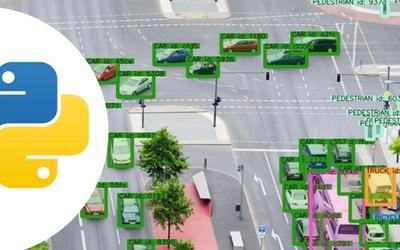
Dive into the world of computer vision with this beginner-friendly, project-based course. Learn how to leverage the powerful YOLO (You Only Look Once) architecture to build real-time AI applications from scratch. Through hands-on exercises, you will master everything from running pre-trained models and creating custom datasets to implementing robust object tracking. By the end of this journey, you will have the practical skills to build and deploy your own intelligent vision systems.
Smart Traffic Monitoring and Vehicle Counting System
- Multi-Class Detection: Accurately identifies and categorizes cars, trucks, buses, and motorcycles in a busy environment.
- Persistent Object Tracking: Uses advanced tracking (like ByteTrack) to assign a unique ID to every vehicle, ensuring no vehicle is counted twice, even if it temporarily stops or is partially obscured.
- Directional Line Crossing Logic: Features a virtual boundary line built with OpenCV that tracks the trajectory of bounding box center-points to determine if a vehicle is traveling inbound or outbound.
Artikel Terkait

Memahami Algoritma DBSCAN Clustering: Teori Density-Based dan Implementasi dengan Scikit-learn untuk Deteksi Outlier

Memahami Konsep Feature Selection dengan Chi-Square, Mutual Information, dan RFE: Implementasi dengan Scikit-learn